Overview
Waymark is a schema-driven journey orchestration engine. Instead of encoding multi-step workflow logic inside your application code, you define journeys as structured JSON documents — and Waymark's runtime engine evaluates them on every step submission.
This means product and operations teams can modify journey branching logic, add compliance checks, and create new flows without engineering deployments.
Waymark is engine-agnostic. Any HTTP client can consume the REST API — React, Vue, React Native, Node.js, or a plain shell script.
Key concepts at a glance
| Concept | Description |
|---|---|
Flow | A versioned container of nodes and connections. The journey definition. |
Node | A single step. Its type controls rendering; jsonContent provides configuration. |
Connection | A directed edge between nodes, with optional condition evaluated against submitted data. |
Session | A runtime instance of a flow for a specific customer. |
Submission | The recorded payload for each completed node. |
CustomerProfile | Optional profile that conditions can reference (country, risk tier, metadata). |
Getting Started
Prerequisites
- .NET SDK 10.x
- Node.js 22.x (for frontend)
- Docker (for local PostgreSQL)
1. Clone the repository
git clone https://github.com/MaximumTrainer/Waymark
cd Waymark
2. Start local dependencies
docker compose up -dLocal PostgreSQL defaults: host localhost:5432, database onboarding, user/password postgres/postgres.
3. Start the backend API
ConnectionStrings__OnboardingDb="Host=localhost;Port=5432;Database=onboarding;Username=postgres;Password=postgres" \
  dotnet run --project src/backend/OpenOnboarding.Api
Swagger UI is available at http://localhost:5072/swagger (or https://localhost:7252/swagger) in Development mode.
4. Start the frontend
cd src/frontend
cp .env.example .env.local
# Set VITE_API_BASE_URL=http://localhost:5072
# Do NOT set an API key here - see Authentication below
npm install
npm run dev
5. Create your first flow
POST /api/flows
Content-Type: application/json
X-Api-Key: dev-api-key-change-in-production

{
  "name": "My First Journey",
  "nodes": [
    {
      "id": "11111111-1111-1111-1111-111111111111",
      "key": "welcome",
      "type": "Information",
      "title": "Welcome! This is step one.",
      "isStartNode": true
    }
  ],
  "connections": []
}
Architecture
Waymark follows a Ports & Adapters (Hexagonal) architecture. Business rules live in the domain and application layers. Infrastructure adapters (database, HTTP, webhooks) depend on inward-facing ports — never the other way around.
| Layer | Project | Responsibility |
|---|---|---|
| Domain | OpenOnboarding.Domain | Entities: Flow, Node, Connection, Session, Submission, CustomerProfile, Webhook. Enums: NodeType, ConditionOperator, SessionStatus. |
| Application | OpenOnboarding.Application | Service interfaces (ports), request/response contracts, FluentValidation validators. |
| Infrastructure | OpenOnboarding.Infrastructure | WorkflowService, ComplianceRuleEvaluator, FlowService, WebhookService, EF Core DbContext, logic node executors. |
| API | OpenOnboarding.Api | ASP.NET Core controllers, JWT + API key authentication, RBAC policies, OpenAPI. |
The frontend is a Vite + React application. StepRenderer reads NodeDto.JsonContent and renders
type-appropriate UI. JourneyBuilder provides a React Flow graph for visual path inspection.
The Visual Journey Builder at /admin/journey-builder provides a
drag-and-drop canvas for authoring flows without writing JSON.
Journey Schema
A flow is a JSON document describing nodes and their directed connections. The engine stores flows server-side and evaluates them at runtime for each session.
Flow object
| Field | Type | Description |
|---|---|---|
id | UUID | Unique identifier (server-assigned on creation). |
name | string | Human-readable name for this journey. |
description | string? | Optional description. |
nodes | Node[] | Array of journey nodes. |
connections | Connection[] | Array of directed edges between nodes. |
Node object
| Field | Type | Description |
|---|---|---|
id | UUID | Unique node identifier within the flow. |
key | string | Stable slug for referencing this node (e.g. in redirects or webhook payloads). |
type | enum | One of: Form, DocumentUpload, Redirect, Information, Logic. |
title | string? | Display heading shown by the renderer. |
jsonContent | string? | JSON string; schema depends on node type (see Node Types below). |
complianceRuleJson | string? | Optional server-side validation rules (see Compliance Rules). |
isStartNode | boolean | Exactly one node must be true. This is the entry point. |
Connection object
| Field | Type | Description |
|---|---|---|
sourceNodeId | UUID | The node this edge originates from. |
targetNodeId | UUID | The node this edge points to. |
conditionField | string? | Name of the field to evaluate. Omit for an unconditional fallback edge. |
conditionOperator | enum? | One of the 12 supported operators (see Connections & Routing). |
conditionValue | string? | Value to compare against. |
priority | int | Lower = evaluated first. Fallback edges (no condition) are always sorted to the end within the same priority. |
journey.json Reference
In Waymark, journey.json is a flow definition with top-level metadata, nodes, and
connections. The engine evaluates this graph at runtime for each session.
Notation
- IDs are GUID strings for flow and node identity.
nodes[].jsonContentis JSON serialized as a string in the API contract.nodes[].complianceRuleJsonis optional JSON serialized as a string.connections[].priorityis evaluated ascending (lower first).condition*fields can be omitted/null for fallback edges.
Minimal structure
{
  "name": "Journey name",
  "description": "Optional description",
  "nodes": [],
  "connections": []
}
Frontend linkage
| Journey JSON field | Frontend usage | Result |
|---|---|---|
id (selected flow) | App.tsx + useOnboarding | Passed as StartSessionRequest.flowId to start a session. |
nodes[].type | StepRenderer.tsx | Selects rendered step UI (Form, DocumentUpload, Redirect, Information, Logic). |
nodes[].jsonContent | StepRenderer.tsx | Parsed into dynamic form/upload/redirect configuration. |
connections[] | Engine + JourneyBuilder.tsx | Controls branching and edge labels in the graph. |
nodes[] / connections[] | FlowAuthoringPanel.tsx | Editable and validated as JSON in the authoring UI. |
Journey visualization
The frontend visualizes journeys in three ways:
- Runtime step rendering (
StepRenderer) — the live UI a user sees during an onboarding session - Read-only graph (
JourneyBuildervia React Flow) — monitors active session path progress - Visual Journey Builder canvas — interactive authoring UI at
/admin/journey-builder
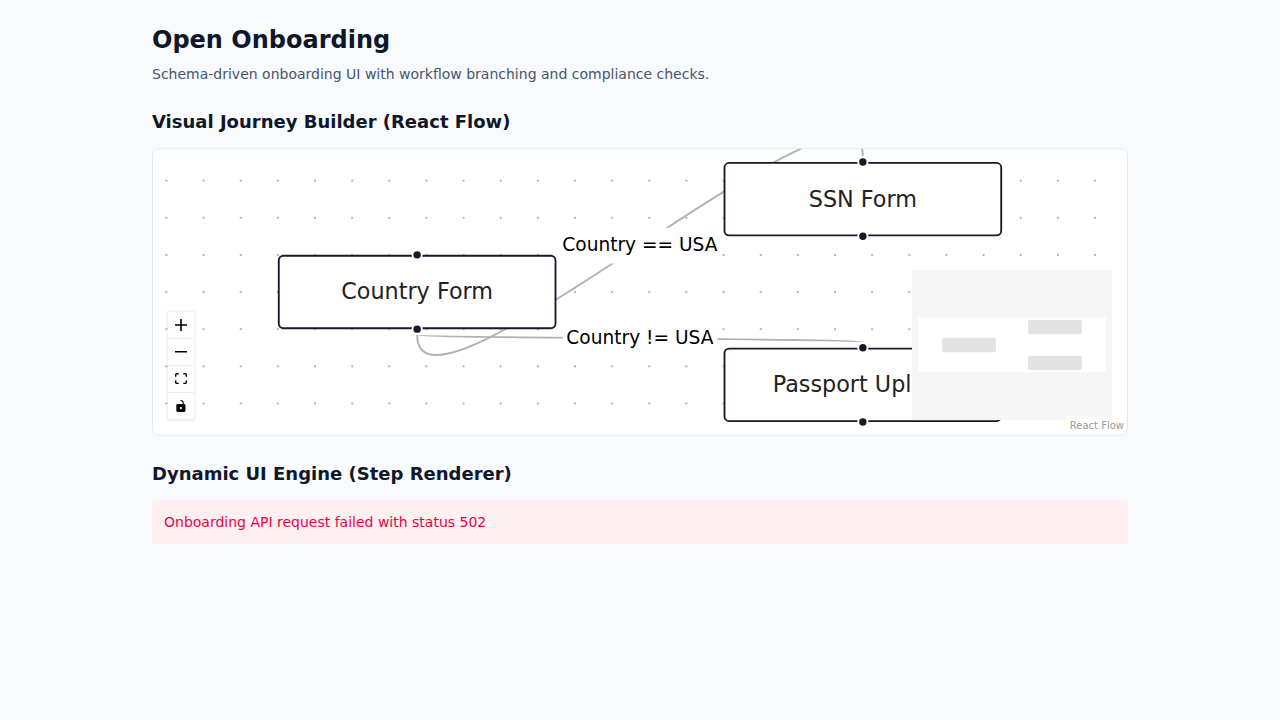
jsonContent for a Form node
[country-form]
      ├── Country = USA ─────► [us-tax-form] ─────► [completed]
      └── Country != USA ────► [passport-upload] ─► [completed]
For a complete real example already included in this repository, see
src/frontend/src/schemas/flow-definition.example.json
.
Node Types
Form
Renders a dynamic form from a field list. Each field maps to an HTML input in the frontend StepRenderer.
{
  "fields": [
    { "name": "CompanyName", "type": "text",   "required": true },
    { "name": "Country",     "type": "select", "required": true, "options": ["USA", "GBR", "DEU"] },
    { "name": "Revenue",     "type": "number", "required": false }
  ]
}
Supported type values: text, email, number, select, checkbox, textarea, date. Unknown types fall back to text.
DocumentUpload
Renders a file picker. Files are uploaded via a separate endpoint before step submission.
{
  "acceptedFileTypes": ["application/pdf", "image/jpeg", "image/png"],
  "maxFiles": 3
}
Global file size limit is controlled by the DocumentUpload:MaxFileSizeBytes configuration key.
Redirect
Navigates the customer to an external URL. Supports {{token}} interpolation resolved server-side before delivery.
{
  "url": "https://kyc-provider.example.com/verify?session={{sessionId}}&customer={{externalCustomerId}}"
}| Token | Resolves to |
|---|---|
{{sessionId}} | Current session GUID |
{{flowId}} | Flow GUID |
{{nodeKey}} | Node key string |
{{customerProfileId}} | Internal customer profile GUID |
{{externalCustomerId}} | Caller-supplied external customer ID |
{{FieldName}} | Any field value from the most recent submission |
Information
Displays a message with no submission required. The node's title field carries the display text. No jsonContent is required.
Logic
Executes a server-side action automatically, without user interaction. The engine auto-advances through up to 20 consecutive Logic nodes before returning control to the caller.
{
  "action": "SetProfileField",
  "field": "kyc_status",
  "value": "pending",
  "failOnError": true
}| Action | Description | Required fields |
|---|---|---|
SetProfileField | Writes a key-value pair into CustomerProfile.MetadataJson. | field, value |
HttpCallback | POSTs the current step payload as JSON to an external URL and records the response. | url |
To add a custom action, implement ILogicNodeExecutor and register it with the DI container.
Connections & Routing
When a step is submitted, WorkflowService.ResolveNextNode selects the next node by evaluating
outgoing connections in order:
- Connections are sorted ascending by
priority(lower = evaluated first). - Within the same priority, fallback connections (no
conditionField) are sorted to the end. - The first connection whose condition evaluates to
truewins. - If no connection matches, the session is marked
Completed.
If conditionField is absent from the submitted payload, the engine falls back to matching
Country and Email fields on the associated CustomerProfile.
All string comparisons are case-insensitive.
Supported condition operators
Equals
NotEquals
Exists
Contains
NotContains
StartsWith
EndsWith
GreaterThan
LessThan
GreaterThanOrEqual
LessThanOrEqual
MatchesRegex
Numeric operators require both sides to parse as decimal; non-numeric values evaluate to false.
Compliance Rules
complianceRuleJson is an optional string on any node. The ComplianceRuleEvaluator service
parses it at step-submission time. A non-empty violation list causes the submission to return HTTP 400.
{
  "requiredFields": ["FieldA", "FieldB"],
  "rules": [
    { "field": "CompanyName", "minLength": 2, "maxLength": 100, "pattern": "^[A-Za-z0-9 ]+$" },
    { "field": "Revenue",     "minimum": 0,   "maximum": 999999999 },
    { "field": "RiskTier",    "allowedValues": ["Low", "Medium", "High"] }
  ],
  "crossFieldRules": [
    { "field1": "EndDate", "operator": "GreaterThan", "field2": "StartDate" }
  ]
}| Section | Description |
|---|---|
requiredFields | Field names that must be present and non-empty. |
rules[].minLength / maxLength | String length constraints. |
rules[].minimum / maximum | Numeric range (parsed as decimal). |
rules[].pattern | .NET regex, 100 ms timeout. |
rules[].allowedValues | Case-insensitive enumeration of permitted values. |
crossFieldRules | Compares two fields. Numeric, date, or lexicographic comparison in order of precedence. |
Session Lifecycle
StartSession ──► Started
                    │
           SubmitStep (compliance pass)
                    │
          ┌─────────▼──────────┐
          │  Logic auto-advance │  (up to 20 consecutive Logic nodes)
          └─────────┬──────────┘
                    │
        ┌───────────┼────────────┐
        │           │            │
   next node    no next node  failOnError
   resolved     resolved      triggered
        │           │            │
     Started    Completed      Error
        │
   AbandonSession
        │
Abandoned| Status | Description |
|---|---|
Started | Active — awaiting next step submission. |
Completed | Terminal — no outgoing connection matched from the last node. |
Abandoned | Terminal — explicitly set via DELETE /api/workflow/sessions/{id} (idempotent). |
Error | Terminal — a Logic node with failOnError: true threw, or 20 consecutive Logic nodes were auto-advanced. |
SSE events are emitted on GET /api/workflow/sessions/{sessionId}/events for step-advanced, session-completed, and session-abandoned transitions.
Context & State
Waymark maintains two forms of state across a journey session:
Submission history
Every step submission is persisted as a Submission record. The engine can reference
field values from any previous submission when evaluating cross-field compliance rules or connection conditions.
Retrieve the full history at any time:
GET /api/workflow/sessions/{sessionId}Customer profile metadata
CustomerProfile.MetadataJson is a free-form JSON bag that persists across sessions for a given customer.
Logic nodes using SetProfileField can write into it. Connection conditions can read from it.
Update it at any time via:
PUT /api/customers/{customerId}Session resumption
Sessions persist server-side indefinitely. To resume a session after a page reload or app restart,
persist the sessionId client-side (e.g. in localStorage) and call:
GET /api/workflow/sessions/{sessionId}/nextThis returns the current node the session is waiting on, allowing seamless resumption.
Visual Journey Builder
The Visual Journey Builder is a drag-and-drop admin interface for designing and publishing onboarding flows
without editing raw JSON. It is available at /admin/journey-builder and requires an authenticated
session with the Operator role.
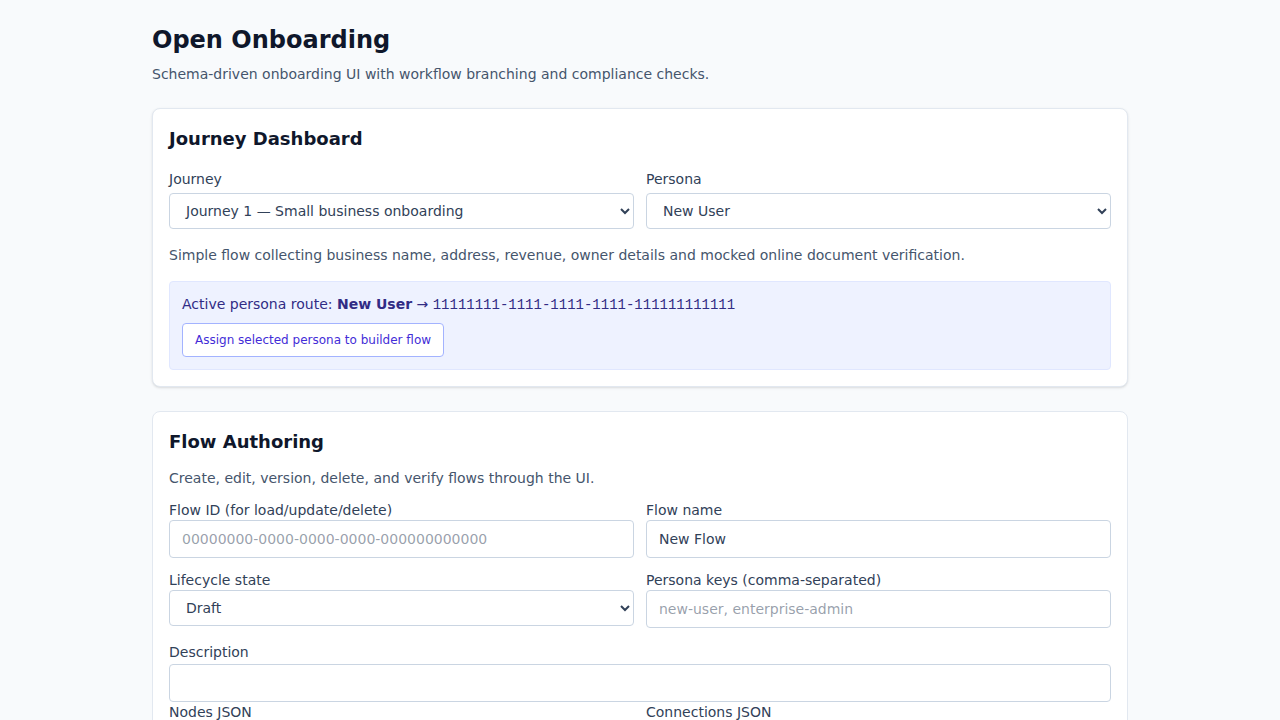
SSO required. Navigating to /admin/journey-builder while unauthenticated
redirects to /login?returnUrl=…. After SSO, the original URL is restored automatically.
Canvas interactions
| Action | How |
|---|---|
| Move a node | Drag it to a new position on the canvas |
| Create a connection | Drag from a node's bottom handle to another node's top handle |
| Select a node or edge | Click it — the Properties Panel opens on the right |
| Delete a node or edge | Press Delete / Backspace, or click Delete node in the Properties Panel |
| Zoom / pan | Scroll to zoom; drag the background to pan; use the Controls toolbar |
Adding nodes
The palette above the canvas contains one button per node type. Clicking a button adds a new node at a default position with a generated GUID. Nodes are color-coded by type:
| Type | Color | Purpose |
|---|---|---|
Form | Blue | Dynamic form rendered from jsonContent field definitions |
DocumentUpload | Purple | File picker with accepted types and maxFiles constraints |
Redirect | Amber | External URL navigation with {{token}} interpolation |
Information | Green | Read-only message; no submission required |
Logic | Orange | Automatic server-side action (SetProfileField, HttpCallback, …) |
Properties Panel
Selecting a node exposes its editable fields in a fixed right-hand panel:
- Title — display label shown to the end user
- Key — stable slug used in routing conditions and URL token interpolation
- Type — dropdown; changing type does not clear
jsonContent - Start node — checking this automatically clears the flag on every other node, enforcing exactly one start node per flow
- jsonContent — type-specific configuration JSON (field list, upload constraints, redirect URL, Logic action)
- Compliance rules — optional
complianceRuleJsonfor server-side validation at submission time
Selecting an edge reveals its condition properties: conditionField,
conditionOperator, conditionValue, and
priority. Leave conditionField empty for a fallback (unconditional) edge.
Save actions
| Button | API call | Effect |
|---|---|---|
| Load flow | GET /api/flows/{id} | Fetches an existing flow and hydrates the canvas |
| Create new | POST /api/flows | Creates the draft as a new flow; sets the returned ID in the panel |
| Save new version | PUT /api/flows/{id} | Publishes the current canvas as the next version of the flow |
| Reset | — | Clears the canvas back to a single empty start node |
Validation errors (missing flow name, invalid GUIDs, zero nodes, no start node, dangling connection references) are displayed inline before any network request is made.
Authentication
Requests are routed to a scheme by a "Combined" policy scheme. Which credential you use depends on who is calling.
- Applicant session token — what a browser uses.
POST /api/workflow/sessions/startis anonymous and returnsapplicantToken, scoped to that one session. Send it asAuthorization: Bearer <token>for the rest of the journey. - API Key — Pass
X-Api-Key: <key>header, for server-to-server callers and local API exploration. Maps to a fullOperatorprincipal. Local development key:dev-api-key-change-in-production. - JWT Bearer — Pass a signed JWT in the
Authorization: Bearer <token>header. - Admin session cookie — established by SAML SSO, used by the operator console.
Never send an API key from a browser. It maps to a full Operator principal, and a bundler inlines environment variables as literal strings — so a key configured in a web app ships to everyone who loads the page. Browsers use the per-session applicant token, which reaches exactly one session and carries no operator rights.
Applicant token lifetime
- Renewal — every step submission returns a fresh
applicantToken. Store it in place of the one you hold; activity is what keeps a long journey from outliving its own credential. - Expiry — an expired token returns
401. - Finished sessions — once a session is
CompletedorAbandoned, its token is refused for writes with403. Reads still work, so a completion screen can render.
Treat 401 and 403 on a session you were completing as the same dead end — the credential is spent and the journey must be restarted — and both as distinct from a 5xx, which is retryable.
Roles: Operator (full access), Applicant (session and step submission), ReadOnly (read-only operator endpoints).
Change the default API key before deploying to production. Set Authentication:ApiKey in application settings or as an environment variable.
Flows API
/api/flows
Create a new flow
/api/flows/{flowId}
Get a flow
/api/flows/{flowId}
Update a flow
Sessions API
/api/workflow/sessions/start
Starts a new session for a given flow.
/api/workflow/sessions/{sessionId}
/api/workflow/sessions/{sessionId}/next
/api/workflow/sessions/{sessionId}
Steps & Documents
/api/workflow/sessions/{sessionId}/steps/{nodeId}/submit
Submits a step. The engine runs compliance validation and resolves the next node.
Returns HTTP 200 with next node on success, HTTP 400 with violation list if compliance fails.
/api/workflow/sessions/{sessionId}/steps/{nodeId}/documents
Multipart upload for DocumentUpload nodes. Field name: files. Returns an array of StoredFileInfo:
Documents are scoped to the session in the route. A token for one session cannot upload to or read from another. The download scopes the lookup as well as the caller: a fileId resolves only when an upload recorded against that session and node carries it, so holding another applicant's file id does not make it readable through your own session. A file that exists but belongs elsewhere returns 404, never 403.
Rate Limits
Every policy is partitioned per caller, so one client exhausting its budget does not affect any other. A rejected request returns 429 with Retry-After: 60 and a problem-details body.
| Policy | Applies to | Partitioned by | Default / min |
|---|---|---|---|
session-start | POST /api/workflow/sessions/start | Client IP — the endpoint is anonymous by design | 100 |
analytics-ingest | POST /api/analytics/events | Applicant session from the token | 120 |
webhook-registration | POST /api/flows/{flowId}/webhooks | Authenticated principal | 20 |
general | Every other controller endpoint | Authenticated principal, else client IP | 300 |
| global ceiling | Every request | Not partitioned | 3000 |
The global ceiling runs in addition to the endpoint policy, so a flood spread across many callers still has a bound. An endpoint naming a specific policy is not additionally bound by general — the two do not stack. Health check endpoints are outside rate limiting entirely.
Callers sharing a credential share a partition: every integration using the same API key spends one budget between them, because the partition key is the principal. Give separate integrations separate credentials. Limits are also per-instance rather than cluster-wide, so with N replicas the effective budget is up to N times the configured value.
Configure any limit with RateLimiting__<Key>, for example RateLimiting__GeneralPerMinute. Behind a proxy, set ForwardedHeaders__KnownProxies so the partition key is the real client rather than the load balancer — until you do, X-Forwarded-For is ignored and every caller shares one partition.
Events & Webhooks
Server-Sent Events (SSE)
/api/workflow/sessions/{sessionId}/events
step-advanced, session-completed, session-abandoned.
Webhook management
/api/flows/{flowId}/webhooks
Register a callback URL
/api/flows/{flowId}/webhooks
List registered webhooks
/api/flows/{flowId}/webhooks/{webhookId}
Remove a webhook
/api/flows/{flowId}/webhook-deliveries
View delivery history and retries
Webhook payloads include a X-Webhook-Signature header for HMAC verification. Failed deliveries are retried with exponential back-off.
React / Next.js Integration
The repository ships a reference useOnboarding hook that manages session state and SSE consumption. You can copy it directly or model your own integration after it.
Initialize and start a session
import { useRef, useState } from 'react'

const API = import.meta.env.VITE_API_BASE_URL
// No API key. The browser holds only the token for the session it started.

export function useWaymark(flowId: string) {
  const [sessionId, setSessionId] = useState<string | null>(null)
  const [currentNode, setCurrentNode] = useState<NodeDto | null>(null)
  const [status, setStatus] = useState<'idle' | 'active' | 'completed' | 'expired'>('idle')
  const token = useRef<string | null>(null)

  async function start() {
    // Anonymous: the entry point of a public journey, so there is no credential yet.
    const res = await fetch(`${API}/api/workflow/sessions/start`, {
      method: 'POST',
      headers: { 'Content-Type': 'application/json' },
      body: JSON.stringify({ flowId }),
    })
    const data = await res.json()
    token.current = data.applicantToken
    setSessionId(data.sessionId)
    setCurrentNode(data.currentNode)
    setStatus('active')
  }

  async function submit(nodeId: string, payload: Record<string, unknown>) {
    const res = await fetch(
      `${API}/api/workflow/sessions/${sessionId}/steps/${nodeId}/submit`,
      {
        method: 'POST',
        headers: {
          'Content-Type': 'application/json',
          Authorization: `Bearer ${token.current}`,
        },
        body: JSON.stringify({ payload }),
      }
    )

    // 401 expired, 403 the session ended: the credential is spent either way and
    // the journey cannot resume. Distinct from a 5xx, which is worth retrying.
    if (res.status === 401 || res.status === 403) {
      setStatus('expired')
      return
    }
    if (!res.ok) throw new Error(`submit failed with status ${res.status}`)

    const data = await res.json()
    // Keep the renewal, or a long journey outlives its own token.
    if (data.applicantToken) token.current = data.applicantToken

    setCurrentNode(data.currentNode ?? null)
    if (data.isCompleted) setStatus('completed')
  }

  return { start, submit, currentNode, status }
}
Render a node dynamically
import { useEffect } from 'react'

function NodeRenderer({ node, onSubmit }) {
  const content = node.jsonContent ? JSON.parse(node.jsonContent) : {}

  useEffect(() => {
    if (node.type === 'Redirect' && content.url) {
      window.location.assign(content.url)
    }
  }, [node.type, content.url])

  switch (node.type) {
    case 'Form':
      return <DynamicForm fields={content.fields} onSubmit={onSubmit} />
    case 'DocumentUpload':
      return <FileUpload accept={content.acceptedFileTypes} onSubmit={onSubmit} />
    case 'Redirect':
      return null
    case 'Information':
      return <p>{node.title}</p>
    default:
      return null
  }
}
Vue / Nuxt Integration
// composables/useWaymark.ts
import { ref } from 'vue'

export function useWaymark(flowId: string) {
  const sessionId  = ref<string | null>(null)
  const currentNode = ref<any | null>(null)
  const isComplete = ref(false)

  const API = import.meta.env.VITE_API_BASE_URL
  // No API key. The browser holds only the token for the session it started.
  const token = ref<string | null>(null)
  const isExpired = ref(false)

  async function start() {
    // Anonymous: the entry point of a public journey, so there is no credential yet.
    const response = await fetch(`${API}/api/workflow/sessions/start`, {
      method: 'POST',
      headers: { 'Content-Type': 'application/json' },
      body: JSON.stringify({ flowId }),
    })
    const data = await response.json()
    token.value       = data.applicantToken
    sessionId.value   = data.sessionId
    currentNode.value = data.currentNode
  }

  async function submit(nodeId: string, payload: Record<string, unknown>) {
    const response = await fetch(
      `${API}/api/workflow/sessions/${sessionId.value}/steps/${nodeId}/submit`,
      {
        method: 'POST',
        headers: {
          'Content-Type': 'application/json',
          Authorization: `Bearer ${token.value}`,
        },
        body: JSON.stringify({ payload }),
      }
    )

    // 401 expired, 403 the session ended: the credential is spent either way.
    if (response.status === 401 || response.status === 403) {
      isExpired.value = true
      return
    }
    if (!response.ok) throw new Error(`submit failed with status ${response.status}`)

    const data = await response.json()
    // Keep the renewal, or a long journey outlives its own token.
    if (data.applicantToken) token.value = data.applicantToken

    currentNode.value = data.currentNode ?? null
    if (data.isCompleted) isComplete.value = true
  }

  return { start, submit, currentNode, isComplete, isExpired }
}
Node.js Integration
// Server-side, so an API key is appropriate here - it never reaches a browser.
// It maps to a full Operator principal, so keep it in server config only.
const BASE = process.env.WAYMARK_API_URL
const KEY  = process.env.WAYMARK_API_KEY

const headers = { 'Content-Type': 'application/json', 'X-Api-Key': KEY }

async function startSession(flowId) {
  const res = await fetch(`${BASE}/api/workflow/sessions/start`, {
    method: 'POST',
    headers,
    body: JSON.stringify({ flowId }),
  })
  // An operator-authenticated start returns no applicantToken: the API key already
  // covers the session, so there is nothing to carry forward.
  return res.json() // { sessionId, isCompleted, currentNode }
}

async function submitStep(sessionId, nodeId, payload) {
  const res = await fetch(
    `${BASE}/api/workflow/sessions/${sessionId}/steps/${nodeId}/submit`,
    {
      method: 'POST',
      headers,
      body: JSON.stringify({ payload }),
    }
  )
  if (!res.ok) throw new Error(`submit failed with status ${res.status}`)
  return res.json() // { sessionId, isCompleted, currentNode } - currentNode is null once complete
}

// Usage
const { sessionId, currentNode } = await startSession('my-flow-id')
const result = await submitStep(sessionId, currentNode.id, { Country: 'USA' })

if (result.isCompleted) {
  console.log('journey complete')
} else {
  console.log('next step:', result.currentNode.title)
}
Example: 3-Step Contact Form
{
  "name": "Contact Form",
  "nodes": [
    {
      "id": "11111111-1111-1111-1111-111111111111", "key": "personal-info", "type": "Form",
      "title": "Your details", "isStartNode": true,
      "jsonContent": "{\"fields\":[{\"name\":\"Name\",\"type\":\"text\",\"required\":true},{\"name\":\"Email\",\"type\":\"email\",\"required\":true}]}",
      "complianceRuleJson": "{\"requiredFields\":[\"Name\",\"Email\"],\"rules\":[{\"field\":\"Email\",\"pattern\":\"^[^@]+@[^@]+\\\\.[^@]+$\"}]}"
    },
    {
      "id": "22222222-2222-2222-2222-222222222222", "key": "message", "type": "Form", "title": "Your message",
      "jsonContent": "{\"fields\":[{\"name\":\"Subject\",\"type\":\"text\",\"required\":true},{\"name\":\"Body\",\"type\":\"textarea\",\"required\":true}]}"
    },
    {
      "id": "33333333-3333-3333-3333-333333333333", "key": "confirmation", "type": "Information",
      "title": "Thank you! We'll be in touch within 24 hours."
    }
  ],
  "connections": [
    { "sourceNodeId": "11111111-1111-1111-1111-111111111111", "targetNodeId": "22222222-2222-2222-2222-222222222222" },
    { "sourceNodeId": "22222222-2222-2222-2222-222222222222", "targetNodeId": "33333333-3333-3333-3333-333333333333" }
  ]
}
Example: Conditional Payment Flow
Routes to credit card validation or PayPal based on the customer's selection. Compliance rules enforce card number format.
{
  "name": "Conditional Payment",
  "nodes": [
    {
      "id": "11111111-1111-1111-1111-111111111111", "key": "select-method", "type": "Form",
      "title": "How would you like to pay?", "isStartNode": true,
      "jsonContent": "{\"fields\":[{\"name\":\"Method\",\"type\":\"select\",\"options\":[\"CreditCard\",\"PayPal\"],\"required\":true}]}"
    },
    {
      "id": "22222222-2222-2222-2222-222222222222", "key": "card-details", "type": "Form",
      "title": "Enter card details",
      "jsonContent": "{\"fields\":[{\"name\":\"CardNumber\",\"type\":\"text\",\"required\":true},{\"name\":\"CVV\",\"type\":\"text\",\"required\":true},{\"name\":\"Expiry\",\"type\":\"text\",\"required\":true}]}",
      "complianceRuleJson": "{\"requiredFields\":[\"CardNumber\",\"CVV\"],\"rules\":[{\"field\":\"CardNumber\",\"pattern\":\"^[0-9]{16}$\"},{\"field\":\"CVV\",\"pattern\":\"^[0-9]{3,4}$\"}]}"
    },
    {
      "id": "33333333-3333-3333-3333-333333333333", "key": "paypal", "type": "Redirect",
      "title": "Redirecting to PayPal…",
      "jsonContent": "{\"url\":\"https://paypal.com/checkout?session={{sessionId}}\"}"
    },
    { "id": "44444444-4444-4444-4444-444444444444", "key": "success", "type": "Information", "title": "Payment accepted!" }
  ],
  "connections": [
    { "sourceNodeId": "11111111-1111-1111-1111-111111111111", "targetNodeId": "22222222-2222-2222-2222-222222222222", "conditionField": "Method", "conditionOperator": "Equals", "conditionValue": "CreditCard", "priority": 0 },
    { "sourceNodeId": "11111111-1111-1111-1111-111111111111", "targetNodeId": "33333333-3333-3333-3333-333333333333", "priority": 1 },
    { "sourceNodeId": "22222222-2222-2222-2222-222222222222", "targetNodeId": "44444444-4444-4444-4444-444444444444" },
    { "sourceNodeId": "33333333-3333-3333-3333-333333333333", "targetNodeId": "44444444-4444-4444-4444-444444444444" }
  ]
}
Example: Enterprise Onboarding
Admin users see a full KYC flow with document upload; guest users are directed to a lightweight information step.
{
  "name": "Enterprise Onboarding",
  "nodes": [
    {
      "id": "11111111-1111-1111-1111-111111111111", "key": "user-type", "type": "Form",
      "title": "Tell us about yourself", "isStartNode": true,
      "jsonContent": "{\"fields\":[{\"name\":\"Role\",\"type\":\"select\",\"options\":[\"Admin\",\"Guest\"],\"required\":true},{\"name\":\"Company\",\"type\":\"text\",\"required\":true}]}"
    },
    {
      "id": "22222222-2222-2222-2222-222222222222", "key": "admin-kyc", "type": "Form", "title": "Identity verification",
      "jsonContent": "{\"fields\":[{\"name\":\"TaxId\",\"type\":\"text\",\"required\":true},{\"name\":\"Jurisdiction\",\"type\":\"select\",\"options\":[\"USA\",\"GBR\",\"DEU\"],\"required\":true}]}",
      "complianceRuleJson": "{\"requiredFields\":[\"TaxId\",\"Jurisdiction\"]}"
    },
    {
      "id": "33333333-3333-3333-3333-333333333333", "key": "admin-docs", "type": "DocumentUpload",
      "title": "Upload your company registration document",
      "jsonContent": "{\"acceptedFileTypes\":[\"application/pdf\"],\"maxFiles\":1}"
    },
    {
      "id": "44444444-4444-4444-4444-444444444444", "key": "flag-for-review", "type": "Logic",
      "jsonContent": "{\"action\":\"SetProfileField\",\"field\":\"kyc_status\",\"value\":\"pending_review\",\"failOnError\":false}"
    },
    { "id": "55555555-5555-5555-5555-555555555555", "key": "guest-welcome", "type": "Information", "title": "Welcome! Your account has been created." },
    { "id": "66666666-6666-6666-6666-666666666666", "key": "admin-complete", "type": "Information", "title": "KYC submitted — we'll review and notify you within 2 business days." }
  ],
  "connections": [
    { "sourceNodeId": "11111111-1111-1111-1111-111111111111", "targetNodeId": "22222222-2222-2222-2222-222222222222", "conditionField": "Role", "conditionOperator": "Equals", "conditionValue": "Admin", "priority": 0 },
    { "sourceNodeId": "11111111-1111-1111-1111-111111111111", "targetNodeId": "55555555-5555-5555-5555-555555555555", "priority": 1 },
    { "sourceNodeId": "22222222-2222-2222-2222-222222222222", "targetNodeId": "33333333-3333-3333-3333-333333333333" },
    { "sourceNodeId": "33333333-3333-3333-3333-333333333333", "targetNodeId": "44444444-4444-4444-4444-444444444444" },
    { "sourceNodeId": "44444444-4444-4444-4444-444444444444", "targetNodeId": "66666666-6666-6666-6666-666666666666" }
  ]
}